To see which apps your email is registered on, run a registration check. It asks each service whether an account exists for the address and returns a yes or no. On November 17, 2026, one Revealer email lookup ran 263 of these checks.
We ran two full sweeps that day. Each reported 87.0 seconds of execution time, and 255 and 252 of the 263 modules had a response time within 5 seconds. The result is a grid of the services where an account exists for the address, plus a count of the services that answered no match.
This guide explains what that result is, what it is not, and what to do with it for your own address. Every number below comes from those two sweeps or from the live catalog that day. Examples use the placeholder [email protected]. Nothing about the addresses used in the sweeps appears here, only counts and service names.
What does an email registration check tell you?
A registration check asks one question per service: is there an account for this address, yes or no. That is the whole result for most modules. A hit carries the service name and the fact that an account exists.
Some modules return a little more. In the first sweep, 2 of the 10 hits also carried public profile fields, a display name and an avatar. The other 8 were existence only.
What it does not do. It does not open the account. It does not show messages, files, orders, payment details or anything else behind the login. It does not show a password, and no Revealer plan shows plaintext passwords anywhere in the product. A registration result is a map of where an address has been used to sign up. Nothing more.
That map is still worth having, because an email footprint is mostly things you forgot: the trial for one project, the fitness app from three phones ago, the store account made for a discount code.
What did a real 263-module sweep look like on November 17, 2026?
We ran two full email sweeps on November 17, 2026, one per test address. Each covered all 263 modules in the catalog.
| Measure | Sweep 1 | Sweep 2 |
|---|---|---|
| Modules in the sweep | 263 | 263 |
| Execution time in the completion record | 87.0 s | 87.0 s |
| Definite yes-or-no answers | 167 | 168 |
| Registered | 10 | 1 |
| Not registered | 157 | 167 |
| Median module response time | 1.26 s | 1.31 s |
| Modules with a response time within 5 s | 255 | 252 |
Sweep 1 found registrations on 10 services, including Dropbox, Adobe, TikTok, Typeform, Replit and X (Twitter). That is ten separate logins, and ten places where a reused password would matter.
Sweep 2 found one registration: Apple. The Apple module joined the catalog in the November 2026 update. An Apple hit is existence only. It says an Apple account is registered to the address.
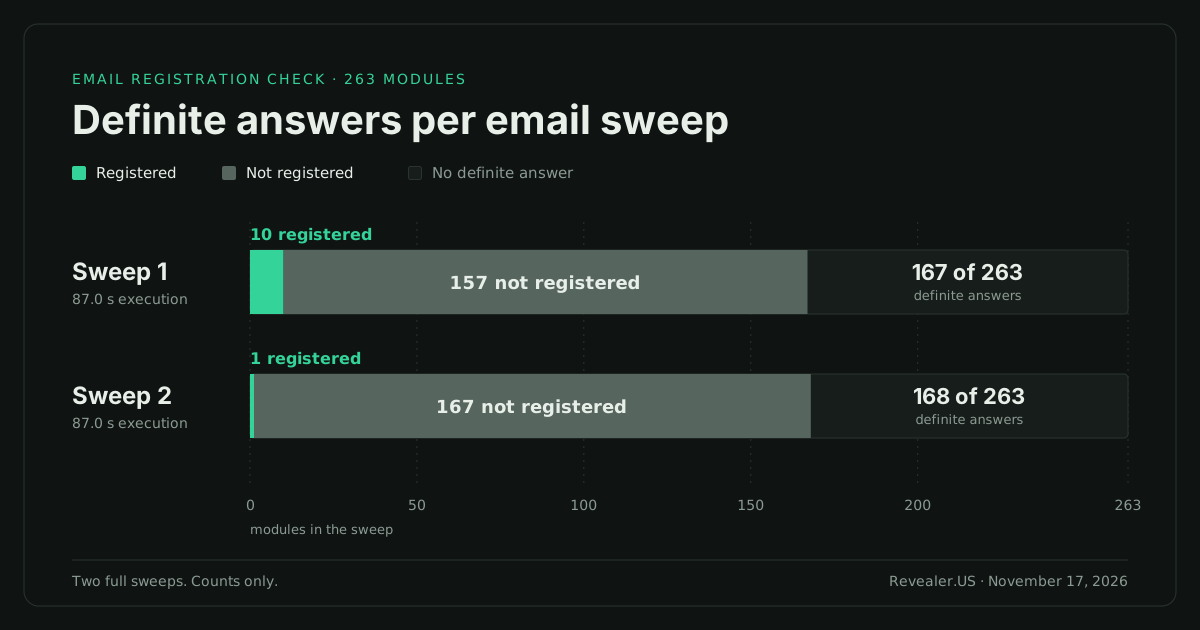
The "not registered" answers matter as much as the hits. A definite "no" means that service's check found no account for the address in that run. It is a strong signal that there is nothing to close there, not a guarantee.
In the product, the grid holds the registered services. The no-match services appear as a count above it, and the check outcomes list shows them by name.
Which popular apps can an email registration check cover?
A result drawn from 263 services needs an order. Revealer's email results pin popular apps to the top of the registration grid, so when a well-known app holds an account for the address, it is the first thing on screen. The pinned list covers 39 apps and starts with Apple. The rest of the grid is grouped by category.
The pinned list is a display order, not a promise that every one of the 39 apps has an email check behind it. These popular apps returned a registered or not-registered result in our sweeps on November 17, 2026.
| Popular app | What the sweeps showed |
|---|---|
| Apple | Registration found in sweep 2. New in the November 2026 catalog |
| CVS | Definite answer in both sweeps. New in the November 2026 catalog |
| Adobe, Dropbox, TikTok, X (Twitter) | Registration found in sweep 1 |
| Microsoft (account recovery check), Yahoo, GitHub | Definite answer in both sweeps |
| Snapchat, Pinterest, Spotify | Definite answer in both sweeps |
| Venmo, Hulu, Booking.com | Definite answer in both sweeps |
That is 15 popular apps with a registered or not-registered answer on the day. Some brands have more than one email check. The counts here are per brand: at least one check for that brand gave a yes or no.
Apple and CVS are the two November additions in that group. CVS returned a clear "not registered" in both sweeps. Apple returned a registration in sweep 2. The full list of November additions is in the November 2026 module update.
Beyond the popular apps, 15 more modules added since October 8, 2026 gave a definite answer in both sweeps: Airtable, BigTeams, Fit Together, Fresha, Kick, Loom, Mail.ru, Maprika, Mozilla, OK.ru, OpenPGP keyserver, Pickleheads, RV Overnights, Swimply and Tubi.
With CVS, that makes 16 new modules that answered in both sweeps. Between October 8 and November 17, 2026, 52 email modules joined the catalog and some were retired, which moved the total from 218 to 263.
What kinds of services do the 263 email modules cover?
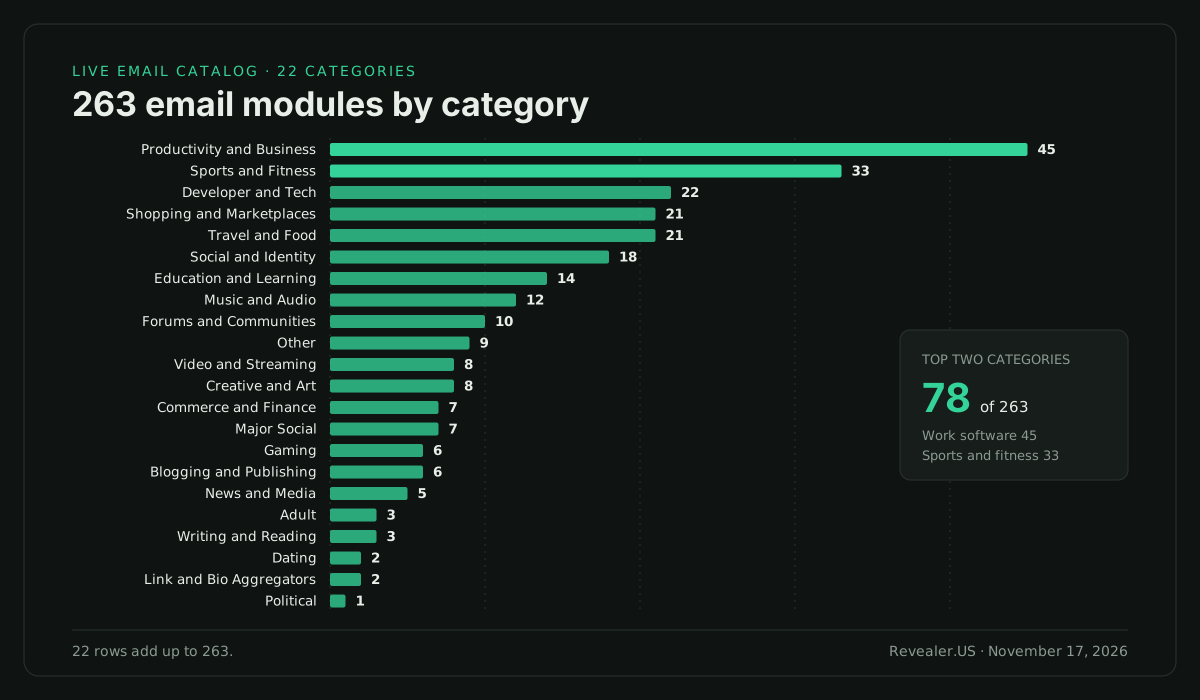
The catalog is not a list of social networks. On November 17, 2026 the largest email category was work software, and the second largest was sports and fitness apps.
| Category | Email modules | What is in it |
|---|---|---|
| Productivity and Business | 45 | Work tools, form builders, file stores |
| Sports and Fitness | 33 | Training, booking and club apps |
| Developer and Tech | 22 | Code hosts, dev tools, tech accounts |
| Shopping and Marketplaces | 21 | Store accounts, often with saved details |
| Travel and Food | 21 | Booking, lodging and dining accounts |
| Social and Identity | 18 | Sign-in and profile services |
| Education and Learning | 14 | Course and study platforms |
| Music and Audio | 12 | Streaming and audio communities |
| Forums and Communities | 10 | Community memberships |
| Other | 9 | Services outside the other groups |
| Video and Streaming | 8 | Video accounts and subscriptions |
| Creative and Art | 8 | Portfolios and creative tools |
| Commerce and Finance | 7 | Payment and money apps |
| Major Social | 7 | The largest social networks |
| Gaming | 6 | Launchers and game accounts |
| Blogging and Publishing | 6 | Blogs and newsletters |
| News and Media | 5 | Reader accounts |
| Adult | 3 | 18+ sites |
| Writing and Reading | 3 | Reading and writing communities |
| Dating | 2 | Dating apps and sites |
| Link and Bio Aggregators | 2 | Link-in-bio pages |
| Political | 1 | Campaign and civic platforms |
The 22 rows add up to 263. A personal address with hits in Shopping, Travel and Fitness is a consumer footprint, and those accounts tend to hold saved addresses and order history. A work address with hits in Productivity and Developer tools is a different risk: old workspaces and repos that outlive the job.
How long does an email check take?
Most of the result arrives early. In sweep 1 on November 17, 2026, 98 modules had a response time within 1 second, 185 within 2 seconds and 255 of 263 within 5 seconds. Only 4 of the 263 had a response time above 10 seconds. The completion record for the whole sweep showed 87.0 seconds of execution time.
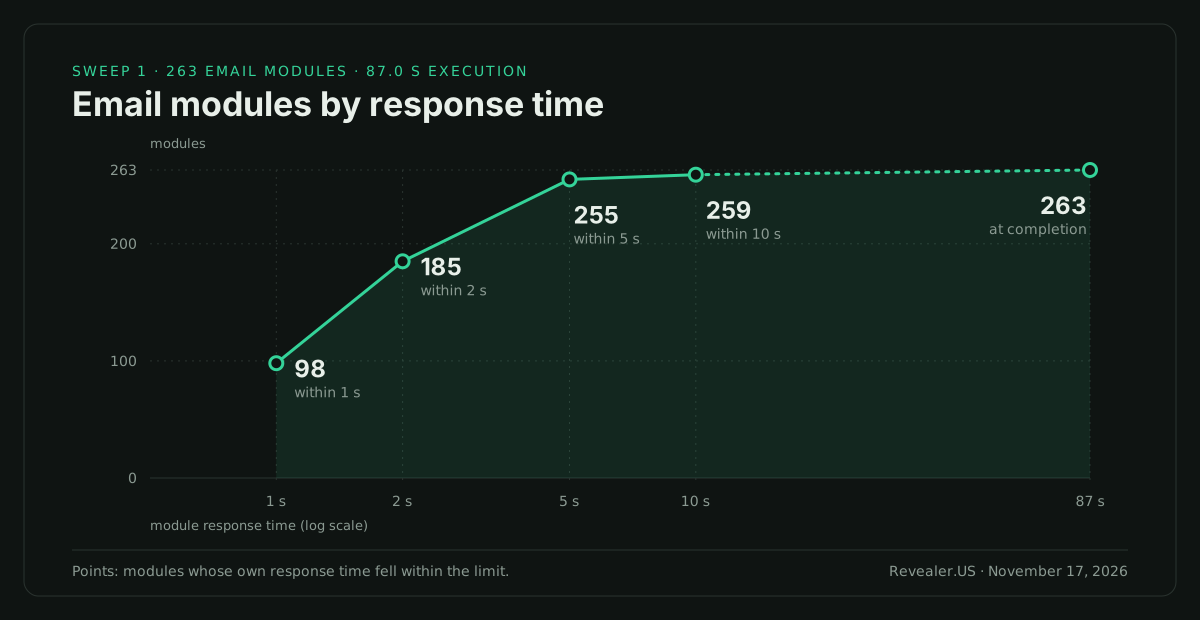
Email checks are slower per module than username checks: a median of 1.26 seconds against 0.35 seconds in a full richard username sweep the same day. The full timing breakdown is in how fast a 1,098-module username search runs.
You can try this without an account. The demo on the Revealer homepage runs the full 263-module email sweep, which takes about 87 seconds. It shows a popular-apps strip with app names only. The demo allows 5 searches every 2 hours in each browser.
For the full grid, use Revealer's email lookup. Free accounts get 10 social previews a day with no card. Paid plans start at $12.99 a month on pricing.
What does the result mean for your own exposure?
Three things, in order of how often they bite.
Forgotten accounts. Every hit you do not recognize at once is an account nobody is watching. It still holds whatever you gave it: a name, a birthday, an address, sometimes a card.
Password reuse. If ten services hold an account for [email protected] and three share a password, a leak at any one of the three opens the other two. The registration grid tells you where the address is used. A breach check tells you where it has leaked. Run both.
Revealer's data breach lookup shows which breaches include your address, with secrets redacted on every plan. Our guide on how to check if your email is in a data breach covers that step in full.
New exposure later. A check is a snapshot. Paid plans include breach monitoring slots, 3 on Starter, 10 on Basic and 25 on Pro, so an address you care about is watched after the first lookup.
For the wider picture beyond email, see our guide to what a digital footprint is and how to check yours.
How to clean up accounts registered to your email
Set aside an hour. Work from the grid, top to bottom.
- Run the email lookup on your own address and export the result as JSON or CSV so you have a list to tick off.
- Sort the hits into three piles: use it, forgot it, never heard of it.
- For "forgot it" accounts, sign in with the service's password reset, remove saved cards and addresses, then close the account from its settings.
- For "use it" accounts, give each one its own password from a password manager. Start with any service that also shows up in your breach lookup.
- Turn on two-factor authentication everywhere it is offered, email account first. Whoever controls the inbox controls every password reset on the grid.
- For "never heard of it" accounts, use the password reset to take control, then close them. If the reset mail never arrives, contact the service's support.
- Put the address in a breach monitoring slot if your plan has one, and repeat the lookup every few months.
- If you want your address out of Revealer results, submit it at opt-out. It is free and needs no account. A verified email address is suppressed automatically and stops appearing in results within 24 hours.
One note on step 8. Opt-out is suppression in Revealer's results. Revealer is a search layer over sources it does not own, so it cannot delete an account or a record at the source. Closing the account at the service itself is what removes it.
| What the result shows | What it means | What to do |
|---|---|---|
| Registered, and you use it | Active account | Own password, two-factor on |
| Registered, and you forgot it | Unwatched account | Strip saved data, close it |
| Registered, and you never signed up | Typo, old signup or misuse | Reset, take control, close |
| Not registered | That check found no account for the address | Usually nothing. Check the service directly if it matters |
| No definite answer | Neither registered nor not registered | Do not read it as a no. Check the service directly |
Limits and fair use
Check your own address, or one you are authorized to check. That means your personal and work addresses, addresses on a domain you administer, or an address inside an investigation with a lawful basis. Revealer's acceptable use policy lists the permitted purposes, including personal security, fraud prevention with authorization and security research.
A registration is not proof of who uses the account. Anyone can type any address into a signup form. Old addresses get recycled. Shared inboxes exist. A hit says an account exists for the address. It does not say who created it or who signs in today.
Count definite answers. Only "registered" and "not registered" are answers. If a service shows neither and it matters to you, check it directly.
Results are live. They are fetched at search time, and Revealer does not keep a copy of your results unless you choose to save them.
If you are working an investigation, our email OSINT investigation workflow picks up from here. For how other tools approach the same job, see email OSINT tools compared.
Use email OSINT only with a lawful basis and within your authorization. Revealer is not a consumer reporting agency. Its data may not be used for employment, tenant, credit, or insurance eligibility decisions.
The short version
One email lookup on Revealer runs 263 registration modules. On November 17, 2026, two full sweeps each reported 87.0 seconds of execution time, with 255 and 252 modules responding within 5 seconds and 167 and 168 definite answers. One sweep found accounts on 10 services and the other found one, on Apple. A hit means an account exists for the address. Nothing behind the login is shown. Use the grid to close forgotten accounts, rotate reused passwords and turn on two-factor. Start with email lookup, then pair it with a data breach lookup.
Frequently asked questions
How do I find all accounts registered with my email? Run a registration check that tests many services at once. Revealer's email lookup ran 263 modules per search on November 17, 2026, and returns a grid of the services where an account is registered, with a count of no-match answers. Open the check outcomes list to see the rest by name.
Does a registration check log in to my accounts or show passwords? No. It asks each service whether an account exists for the address. It does not open the account, read private content or return a password, and no Revealer plan shows plaintext passwords. In our first sweep, 8 of 10 hits were existence only and 2 also carried public profile fields.
Which popular apps can an email check cover? On November 17, 2026 these popular apps returned a registered or not-registered result in our sweeps: Apple, CVS, Adobe, Dropbox, TikTok, X (Twitter), Microsoft, Yahoo, GitHub, Snapchat, Pinterest, Spotify, Venmo, Hulu and Booking.com. When a popular app holds an account for the address, it is pinned to the top of the grid.
Can I remove my email from Revealer results? Yes. Submit it at opt-out. It is free and needs no account. A verified email address is suppressed automatically and stops appearing in Revealer results within 24 hours. That is suppression in Revealer's results, not deletion at the source, so close old accounts at the services themselves.
Can I check someone else's email address? Only with a lawful basis and within your authorization, such as an address on a domain you administer or one inside an authorized investigation. Revealer is not a consumer reporting agency, and results may not be used for employment, tenant, credit or insurance eligibility decisions.