On November 17, 2026, the fastest way for an agency or investigative team to reach Revealer is the contact page. Choose Enterprise sales for team seats, search volume or API volume, or General inquiry for anything else, and write what you need. The page states a reply within one business day and says "Every message reaches a person on the team, not a queue."
Police departments and other law enforcement agencies already use Revealer. We do not publish the names of the agencies we work with, and that confidentiality applies to new teams too. The route is the same for a police department, a prosecutor's investigations unit, a fraud team, a licensed investigations firm or a corporate security group.
Everything below reflects the site, the pricing page and the published policies on November 17, 2026. For what investigators get from a lookup, see how Revealer supports law enforcement and professional investigators.
How does a law enforcement agency contact Revealer?
The contact form asks for your full name, a work email, an optional company and phone number, a topic and a message of 10 to 5,000 characters. Topics include General inquiry, Enterprise sales, Technical support and Other. There is no law-enforcement portal or agency-only intake, and no topic named for legal requests, so use this mapping.
| What you need | Topic to pick | What to say first |
|---|---|---|
| Team seats and search volume for a unit | Enterprise sales | Organization, unit, number of seats |
| Higher API volume than Pro | Enterprise sales | Requests per week and how many source IPs |
| A question about how legal requests are handled | General inquiry | That the message concerns a legal request |
| A report that someone is misusing Revealer | General inquiry or Other, or the contact listed in the Acceptable Use Policy | That it is a policy-violation report |
| A security report about the site or API | General inquiry or Other | That it is a security report |
| A problem with an existing account | Technical support | The account email and what happened |
The Acceptable Use Policy lists its own contact for reports, says reports of policy violations are reviewed within 48 hours and accepts anonymous reports. The contact page welcomes security reports and routes them through the same form.
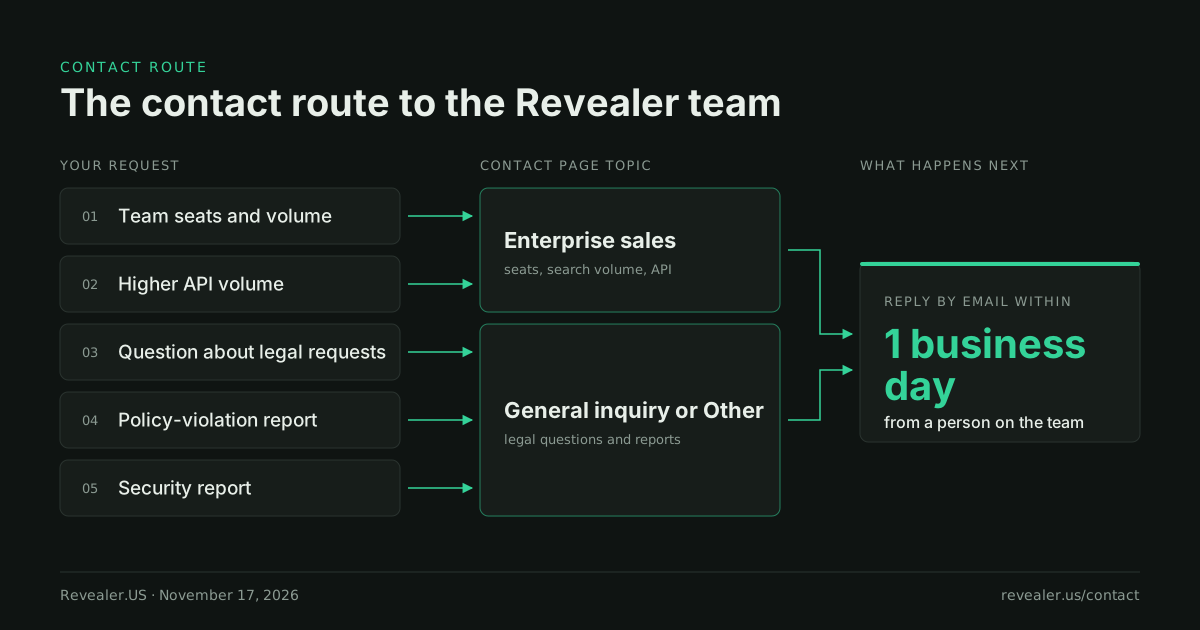
The Enterprise band on the pricing page also opens a short sales form. It asks for a work email, first and last name, company, phone, number of employees, plan interest and what you need, and it reaches the same team.
What should a team request include?
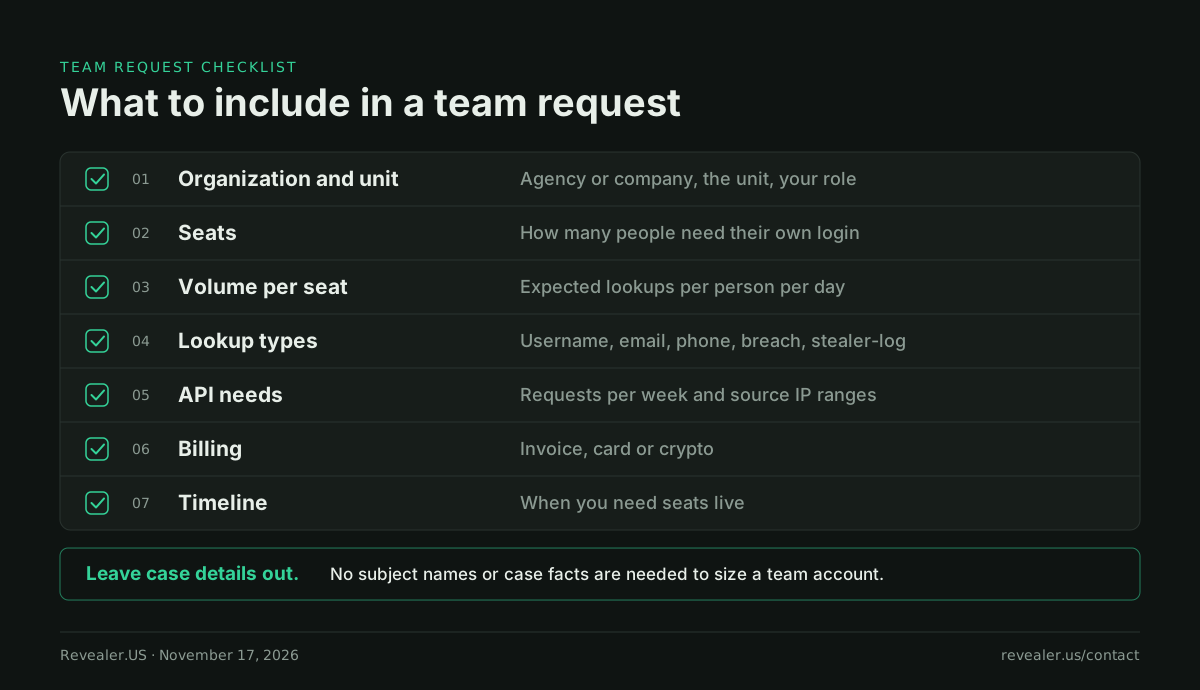
A request that answers these questions in the first message lets the team size the account without a round of follow-up questions.
| Item | What to write | Why it matters |
|---|---|---|
| Organization and unit | Agency or company name, the unit, your role | Enterprise accounts have a team owner and members |
| Seats | How many people need their own login | Enterprise limits are set per seat |
| Volume per seat | Expected lookups per person per day, and peak days | Limits can be set per hour, day or month |
| Lookup types | Username, email, phone, breach, stealer-log search | Shapes which limits matter most |
| API needs | Requests per week, requests per second, source IP ranges | API volume is set per account, and calls are accepted only from whitelisted IPs |
| Billing | Invoice, card or crypto | All three are offered on the sales form |
| Timeline | When you need seats live | Useful for planning onboarding |
Keep case details out of the message. Nobody needs the name of a subject or the facts of an investigation to size a team account.
What does Revealer Enterprise include?
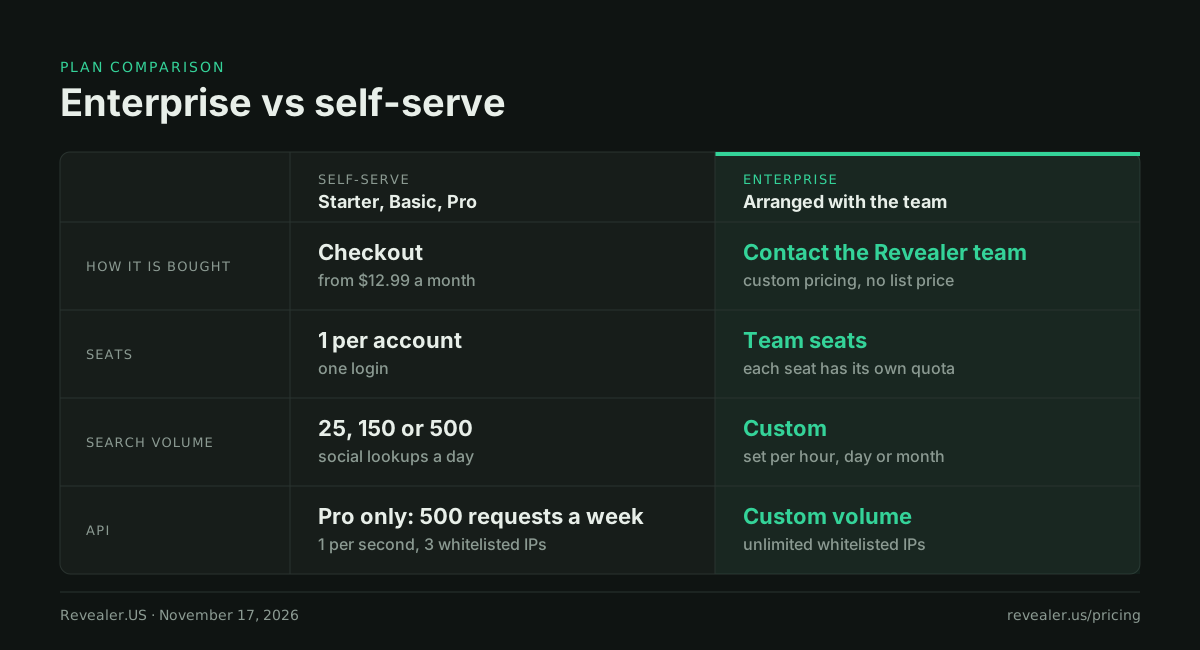
Enterprise is arranged with the Revealer team. It is not sold at checkout and it has no published list price. The pricing page describes it in one line: "Team seats and custom volume per seat, by the hour, day or month. Custom API volume and an SLA."
The plan's feature list on November 17, 2026:
- Team seats, with members invited by email
- Custom search volume per hour, day or month
- AI Deep Search
- Full stealer-log (device exposure) search
- Custom API volume and unlimited whitelisted IPs
- A dedicated account manager and 24/7 support
- Custom integrations
- An SLA
How seats work. Each seat gets its own access and its own quota. The seat count includes the team owner. Members join by emailed invite and need a verified email address before they can join the team.
What every seat searches. Every seat gets the full product. On November 17, 2026, the live catalog held 1,098 username modules, 263 email modules and 58 phone modules, with breach and stealer-log search in the same account. A username lookup runs the full username catalog in one request and streams results as each module finishes.
Can a unit start today without a contract?
Yes. Starter, Basic and Pro are self-serve at checkout, and a Free account needs no card. No separate contract or procurement process is required to begin on any of them. The standard Terms of Service and Acceptable Use Policy apply, as they do to every account. A practical way to size seats: have one person run real work on a self-serve plan for a week, then send those numbers.
| Plan | Free | Starter | Basic | Pro | Enterprise |
|---|---|---|---|---|---|
| Price | $0 | $12.99/mo or $99/yr | $29.99/mo or $300/yr | $79.99/mo or $800/yr | Custom |
| How it is bought | Sign up, no card | Checkout | Checkout | Checkout | Arranged with the team |
| Seats | 1 | 1 | 1 | 1 | Team seats, per-seat limits |
| Social lookups | 10 previews a day | 25 a day | 150 a day | 500 a day | Custom per hour, day or month |
| Breach lookups | 10 previews a day | 50 a day | Unlimited | Unlimited | Custom |
| API | No | No | No | 500 requests a week, 1 per second, 3 whitelisted IPs | Custom volume, unlimited whitelisted IPs |
Prices and limits are from the pricing page on November 17, 2026. Free results are previews with some fields locked. Daily allowances reset at 00:00 UTC.
Pro is the plan to test the API on. Usage is counted separately from dashboard lookups, the week resets on Monday at 00:00 UTC, and the reference is public at docs. A key works only from the addresses on its whitelist. If 500 requests a week is too small, write in under Enterprise sales with your real numbers.
Where does an agency send a legal request?
The Terms of Service and the Privacy Policy each list a contact for legal notices, and those pages are the place to get it. If you have a question about a request before you serve it, use the contact page under General inquiry. There is no separate intake system beyond those routes.
Section 6 of the Privacy Policy says requests from law enforcement are evaluated under applicable law. Keep that in mind before you draft a request. Revealer is a search layer over public sources and third-party data sources, not a way to reach private messages or non-public account data on any platform. Our explainer on whether OSINT is legal covers where open sources stop.
What should every team know before the first search?
Agency users work under the same terms as every other account. The rules, the FCRA limit, password redaction and opt-out are covered in Revealer's safeguards and in how Revealer supports investigators. For what a lookup returns, see what Revealer will and won't return.
The short version
Agencies and investigative teams reach Revealer through the contact page: Enterprise sales for seats, volume and API, General inquiry for the rest, with a reply within one business day. Enterprise gives each seat its own quota, set per hour, day or month, plus custom API volume and an SLA. A unit can start the same day on Free, or on a paid plan from $12.99 a month. Legal requests are evaluated under applicable law, and Revealer may provide information in response to valid, binding legal process. If your team wants to talk about access, volume or how requests are handled, write to us on the contact page.
Revealer is not a consumer reporting agency. Its data may not be used for employment, tenant, credit, or insurance eligibility decisions.
Frequently asked questions
Is there a law-enforcement portal or an agency-only version of Revealer? No. There is no separate portal, no agency-only version and no separate agency inbox. Every organization uses the same contact page and the same product.
Is there a list price for Enterprise? No. Enterprise pricing is custom and arranged with the Revealer team. Include seats, volume per seat and API volume in your message. Enterprise cannot be bought at checkout.
How fast will we hear back? The contact page states a reply within one business day and says every message reaches a person on the team. Revealer does not publish a response time for legal process.
Does a team share one pool of searches? No. Each seat has its own access and its own quota, and the seat count includes the team owner. Enterprise limits are per seat and can be set by the hour, day or month.
Can we pay by invoice? The Enterprise sales form lists invoicing, crypto or card billing. Say which one you need in your first message. Self-serve plans are paid at checkout by card or crypto.